

In field service operations, sales management is one of the fundamental business functions. However, it is not uncommon to find companies managing the process from order intake to payment confirmation across multiple, disconnected systems. As a result, extra work such as duplicate data entry occurs, and in many cases, companies fail to establish an accurate and reliable management framework.
Against this backdrop, this article focuses on the “Sales Management” functionality of CSOne. By leveraging CSOne’s sales management capabilities, we would like you to experience firsthand how dramatically operational efficiency can be improved.
Step1) Service Inquiry / Case Creation
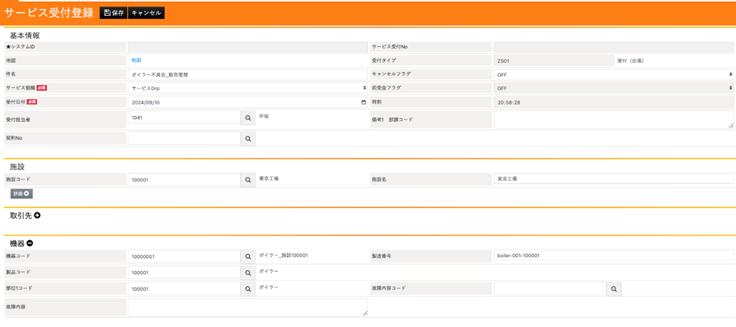
The first step is to register the service case in the system. In this example, we assume that an inquiry has been received from a fictional customer, JR Tokaido Main Line Co., reporting a malfunction in a boiler. The customer’s site is set as the Tokyo Plant.
If the equipment and components installed at the relevant site have already been registered in the master data, the user only needs to select them from the available options when creating the case. There is no need to enter information from scratch. As a result, even newly hired staff can handle service inquiries and register cases accurately and with ease.
Step2) Field Service Reporting
In the case of an emergency request, a service technician is dispatched and proceeds directly to the site. Depending on the company, there are cases where a quotation is submitted and customer approval is obtained before the site visit. In this example, however, priority is given to the on-site visit.
With CSOne, a quotation can be created in advance or issued after the work is completed, and the order in which data is registered is flexible.
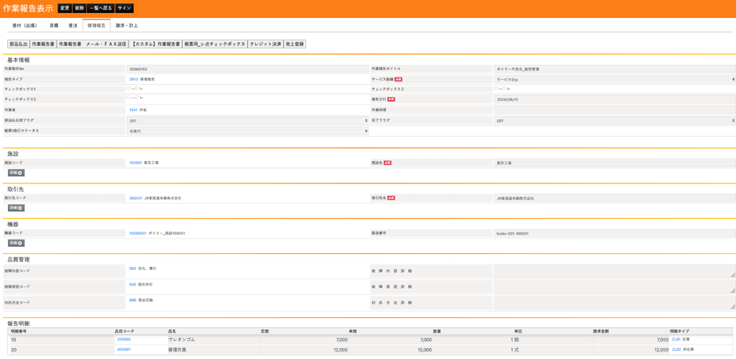
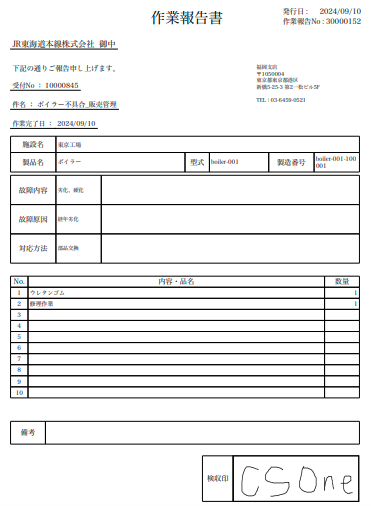
After receiving the malfunction report and arriving at the factory, the service technician inspects the boiler and determines that the root cause is wear and tear. As a result, replacing a part—urethane rubber—is identified as the appropriate corrective action. Accordingly, the required part (urethane rubber) and the repair labor cost are entered in the report details section.
This process can be handled on multiple devices, so if the technician has a tablet, the work report can be completed directly at the site. In other words, there is no need to return to the office after completing the work.
In addition, the customer’s signature can be obtained on the spot within the same work report. A PDF version of the report can then be generated with just a few clicks and sent to the customer by email immediately.
Step3) Quotation
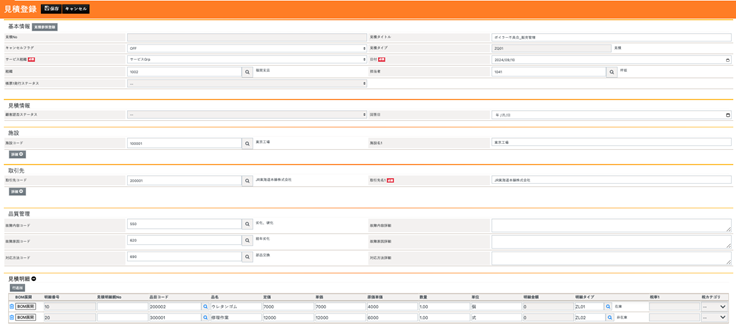
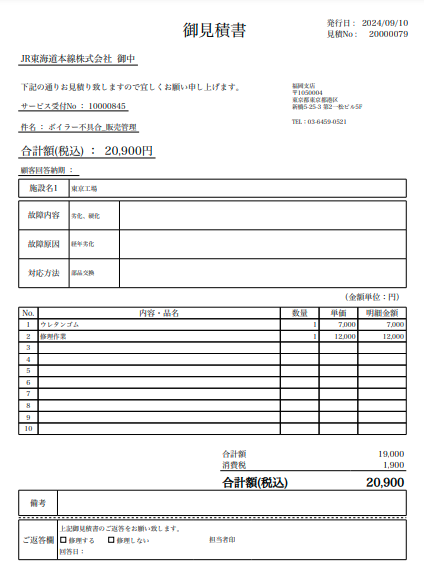
This section explains a scenario in which a quotation is issued after the work report has been submitted. By clicking the “Quotation” button, the information from the work report—such as site details, failure description, and line items—is automatically carried over, allowing the quotation to be created without re-entering data.
If there are no issues with the content, the quotation can be issued simply by clicking the save button. In other words, a formal quotation can be generated with just two clicks, without any additional input.
As with the work report, the quotation can be sent directly to the customer by email from within the system. Once the customer approves the quotation, the process is completed by clicking the customer approval button on the management screen.
Step4) Order Processing
Once the quotation has been approved by the customer, the order is processed internally. By executing the customer approval action for the relevant quotation, an order is registered with all previously entered information automatically carried over.
Step5) Invoicing
The process then moves on to invoicing. By clicking the billing and posting button, the invoice registration screen is displayed. As with the previous steps, all relevant information is automatically carried over, so the user only needs to confirm that there are no changes to the final line-item amounts.
As with work reports and quotations, the invoice can be converted into a PDF and sent to the customer by email with a single click.
CSOne is fully compliant with Japan’s invoice system and the Electronic Books Preservation Act. While many companies have struggled to adapt to changes in document formats and storage requirements resulting from legal revisions, CSOne, as a cloud-based service, can respond to such changes quickly and flexibly—another key strength of the system.
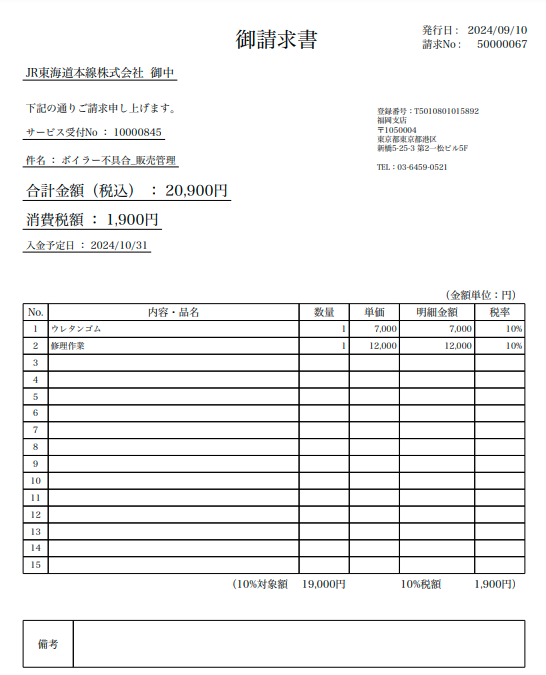
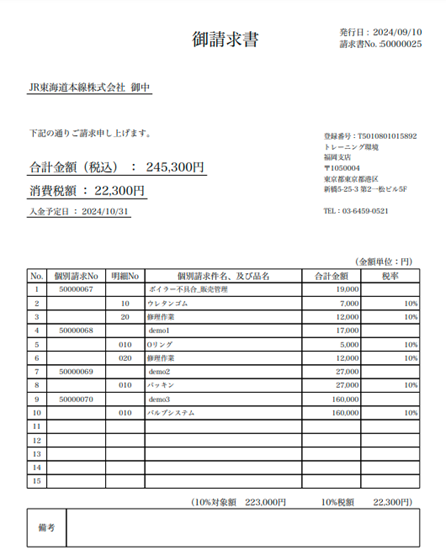
The invoice described above is issued on a per-case basis. In actual business operations, however, it is common to consolidate multiple cases and issue invoices on a monthly closing basis. CSOne addresses this requirement through its “Closing Invoice” functionality.
From the closing invoice processing screen, the user simply enters the relevant conditions. In this example, since the target cases are from September 2024, “202409” is entered in the year–month field, and the process is executed.
 As a result, all individual invoices for the relevant customer for September 2024 are displayed in a consolidated list. In this example, there are a total of four cases to be billed for September.
If there are no issues with the content, a consolidated invoice can be generated as a PDF and sent to the customer by email.
Step6) Payment Confirmation
Finally, we explain the last step: confirming payment, also known as payment reconciliation. From the payment reconciliation registration screen, the user enters the scheduled payment date in the payment details section—October 31, 2024 in this example, assuming end-of-month payment in the following month—along with the billing customer name, JR Tokaido Main Line Co.
By clicking the payment proposal button, the system displays the total amount expected to be received from JR Tokaido Main Line Co. by October 31, 2024. In this case, the amount is shown as JPY 245,300.
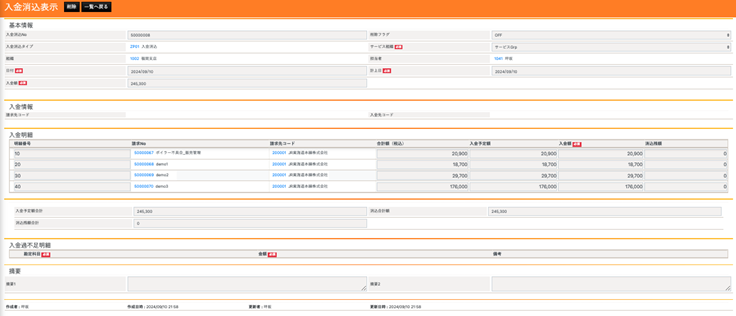 Once the receipt of JPY 245,300 is confirmed in the bank account, the amount is entered in the payment amount field, and the reconciliation is completed by clicking the save button.
Summary
The six steps outlined above provide an overview of CSOne’s sales management functionality. In many organizations, each of these steps is often managed in a separate system. Through this article, we hope you have gained a clearer sense of the benefits of managing the entire process—from order intake to payment confirmation—in a centralized manner.
If you feel there are any challenges in your current sales management operations, we encourage you to contact CSOne. We will be happy to propose a solution tailored to your company’s specific situation and challenges.
For more information, including “Request Materials”, please refer to the links below.